
v1.0.0 · released 5 November 2026
Deploy from Git.One binary. 52 MB.
Rivetr is a self-hosted platform as a service in a single Rust binary: embedded SQLite, embedded reverse proxy, automatic HTTPS, and 365 one-click services. No Redis. No PostgreSQL. No Traefik. Just Docker or Podman.
- Measured memory
- 52 MB RSS
- External services
- 0
- Service templates
- 365
- License
- MIT
Replaces
The open-source alternative to managed platforms. Self-host the developer experience of Vercel, Heroku, Netlify, Railway, Render, Coolify, and Dokploy on a server you own, with no vendor lock-in and no bill per seat.
Runtimes and languages
Docker · Podman · Node.js · Python · Go · Rust · Ruby · PHP · Bun · Deno
Databases
PostgreSQL · MySQL · MariaDB · MongoDB · Redis · ClickHouse
Git and registries
GitHub · GitLab · Gitea · Bitbucket · Docker Hub
The dashboard
A real control plane, not a config file
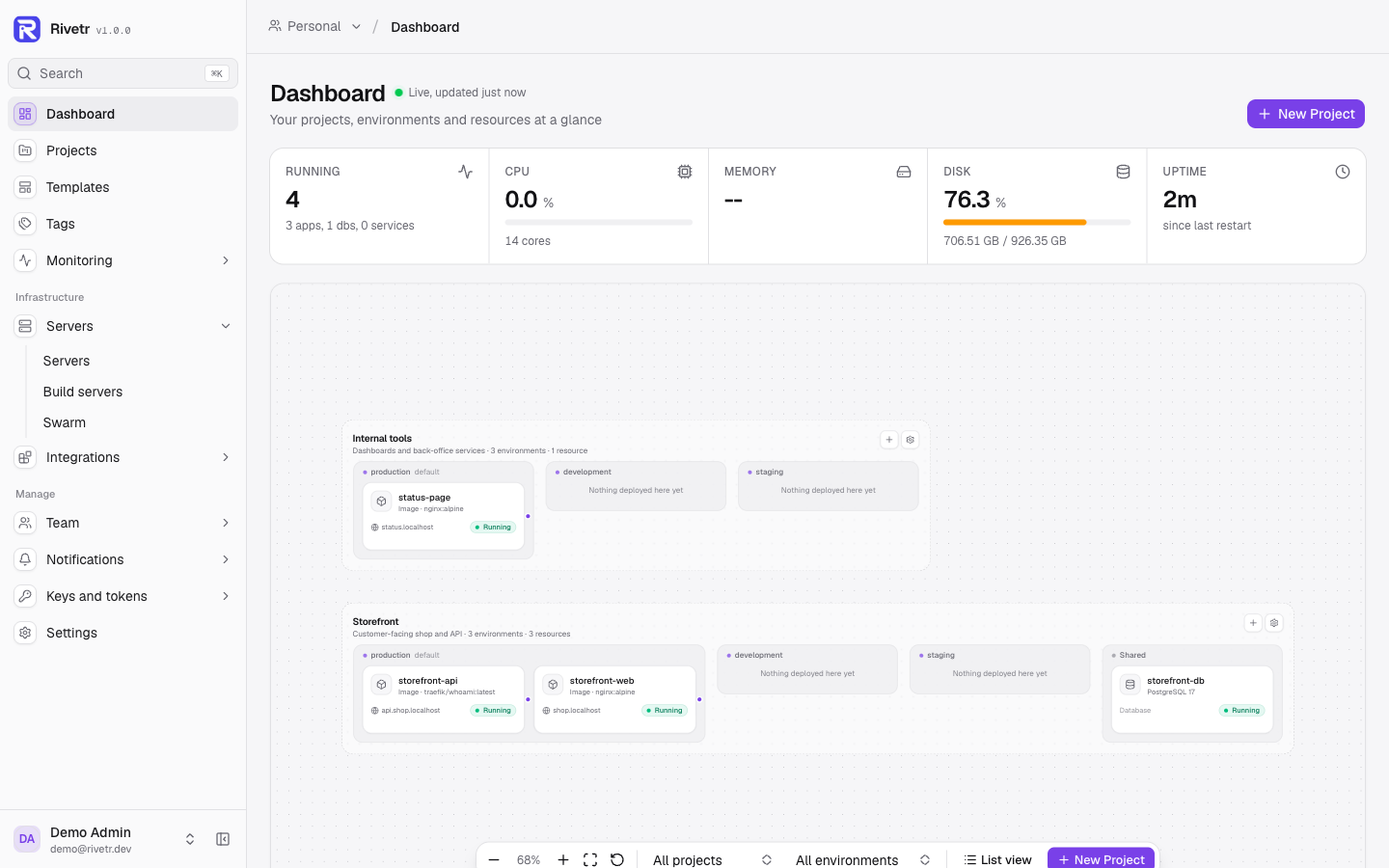
Apps, databases, services, servers, deployments, and 365 templates from one UI. Or use the CLI, the TUI, the API, or the MCP server. Everything ships in the binary.
01 / 04
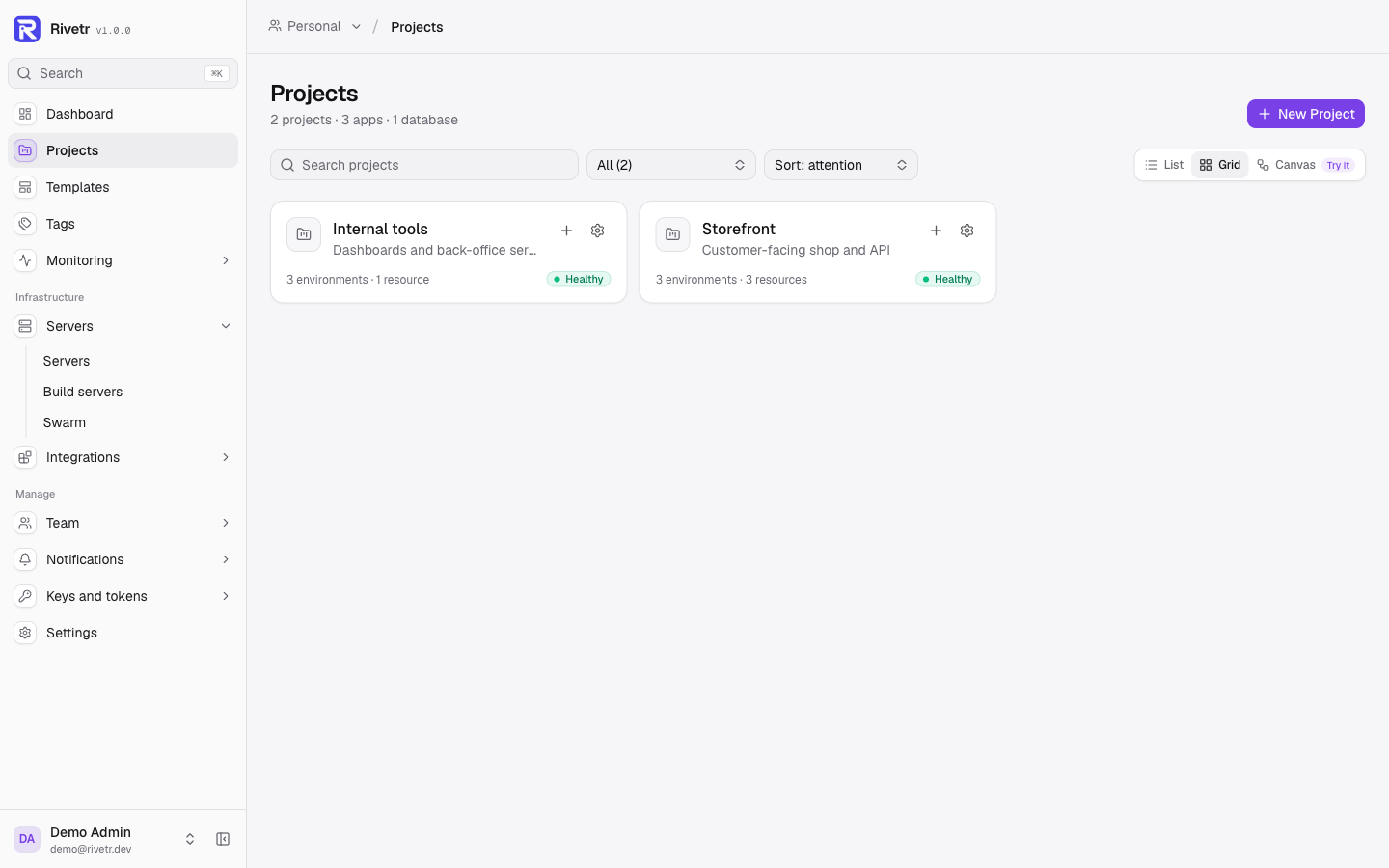
Every project, one glance
Projects show a health pill, their environments, and every app, database, and service inside. Failing resources sort first.
- Available in
- 1.0.0
- Needs
- Docker or Podman
- External services
- None
Released 5 November 2026
What landed in 1.0
The largest release so far rebuilt the dashboard and added real service deployments, passkeys, traffic analytics, and a way to roll back database data with the app.
- 01v1.0
A rebuilt dashboard
Grouped sidebar, breadcrumb switchers, a status pill, and consistent sections across apps, databases, and services.
Read more - 02v1.0
Projects canvas
A zoomable map of every project, environment, and resource with live status. Switch between list, grid, and canvas.
Read more - 03v1.0
Make it yours
Per-user theme customisation: light, dark, or system, accent, neutral, radius, density, font, and accessibility options.
Read more - 04v1.0
Passkeys and traffic analytics
Sign in with a passkey, then see per-app, per-server, and per-team traffic with optional GeoIP country breakdown.
Read more - 05v1.0
Real Docker Compose deploys
Deploy, build, hook, and roll back compose services by image digest, with encrypted env vars and per-container terminals.
Read more - 06v1.0
Rollback with data
Snapshot linked PostgreSQL, MySQL, MariaDB, MongoDB, Redis, and KeyDB databases before a deploy, then restore on rollback.
Read more
Features
One binary. Every part of the platform.
No add-ons, paid tiers, or feature flags. The proxy, the database console, the scheduler, and the API ship in the same binary as the deploy pipeline.
Deploy from Git
Clone, build, check, switch. The whole path from push to live.
Git-native deploys
GitHub, GitLab, Gitea, Bitbucket, or any Git URL. Webhook signature verification, deploy by branch, commit SHA, or tag.
Any build type
Dockerfile, Nixpacks, Railpack, Cloud Native Buildpacks, static sites, or a prebuilt image. Auto-detected per app.
Zero-downtime releases
Health check, atomic proxy switch, then drain in-flight requests from the old container. Automatic rollback when the check fails.
Preview environments
Every pull request gets its own subdomain, on all four Git providers. Preview apps are removed when the PR closes or merges.
Platform services
The supporting infrastructure, provisioned from the same dashboard.
Managed databases
PostgreSQL 18, MySQL, MariaDB, MongoDB, Redis, DragonflyDB, KeyDB, ClickHouse, and LibSQL. Link one to an app and its env vars are injected.
Docker Compose servicesnew in 1.0
Deploy with a button, build from Git or a server path, run pre- and post-deploy hooks, and roll back by image digest.
365 service templates
AI, analytics, CMS, monitoring, security, and more, across 26 categories. One click, encrypted variables, running.
Scheduled jobs and restarts
Cron-based commands inside running containers, plus zero-downtime scheduled restarts with run history and failure notifications.
Teams and security
Multi-tenant from the first login, encrypted at rest, audited throughout.
Passkeys, 2FA, and SSOnew in 1.0
Passkey sign-in, TOTP with recovery codes, OAuth through five providers, and any OpenID Connect provider for SSO.
Roles and permissions
Five role presets built from 24 abilities, custom roles per team, per-member resource overrides, and view-only app sharing.
Encrypted secrets
AES-256-GCM with a versioned format and per-install salt. External managers: Vault, OpenBao, Infisical, Doppler, AWS Secrets Manager.
Scoped API tokens
rvt_ tokens stored as SHA-256 hashes, with six scopes, optional team or project limits, expiry, pause, and roll.
Operations
Know what is running, why it broke, and what to do next.
Live logs and search
Stream over WebSocket or SSE, search deployment history, and set per-app retention. Long lines stay inside the log pane.
Metrics and trafficnew in 1.0
Prometheus /metrics, health-check latency, uptime, and per-app, per-server, and per-team traffic with optional GeoIP.
Crash recovery
Restart with exponential backoff and configurable limits. Apply CPU and memory limits live with docker update, no redeploy.
Deploy controls
Approvals, freeze windows, scheduled deploys, watch paths, ZIP uploads, and cancellation of queued or running deployments.
Developer experience
A dashboard, a terminal, an editor, and an API. Pick your surface.
Projects canvasnew in 1.0
A zoomable view of projects, environments, and resources with live status, filters, and a side panel. Also list and grid views.
Browser terminal and files
Shell into containers and remote SSH servers, and browse, read, write, or delete files on any registered server.
TUI, CLI, and MCP
rivetr tui for a keyboard-driven dashboard, a full CLI, and a built-in MCP server with 11 tools for AI assistants.
Theme customisationnew in 1.0
Each user picks mode, accent, neutral, radius, density, font, sidebar style, reduced motion, and high contrast.
Scale and backup
More servers, more replicas, and a way back when something goes wrong.
Multi-server deploys
Build once, then roll the image to servers in batches, with health checks per container and traffic shifting batch by batch.
Docker Swarm
Initialise a swarm, manage nodes, scale services, and tune the service spec with placement, update, and rollback policy.
Build servers and registries
Offload builds to dedicated nodes and push the finished image to any registry, or stream it over SSH when no registry is available.
Database, volume, and instance backups
On a schedule, to local disk or S3-compatible storage, with retention and one-click restore. S3 downloads are checked against the stored size and SHA-256 first.
Service templates
365 one-click services across 26 categories
Databases, AI models, analytics, monitoring, CMS, and more. Every template is a reviewed compose definition with encrypted variables, ready to deploy.
- AI / LLMOllama · Open WebUI · LiteLLM
- AnalyticsPlausible · Matomo · Metabase
- CMSWordPress · Ghost · Strapi
- DatabasesPostgreSQL · MongoDB · Redis
- Dev toolsGitea · Drone · Vault
- MonitoringGrafana · Uptime Kuma · Prometheus
- Automationn8n · Node-RED · Activepieces
- CommunicationRocket.Chat · Mattermost · Element
- Files and mediaNextcloud · Jellyfin · MinIO
- SearchMeilisearch · Typesense · SearXNG
- SecurityVaultwarden · Authelia · Keycloak
- Project managementPlane · Vikunja · Focalboard
Templates ship in the binary and are maintained in the repository. New ones are welcome as pull requests. Contribute on GitHub
Setup
From zero to deployed in three steps
A single installer, a repository, and a push. Certificates and routing are handled for you.
- 01
Install the binary
One command installs Docker if needed, build tools, the latest Rivetr binary, a systemd unit, and a config with a generated admin token.
curl -fsSL https://raw.githubusercontent.com/KwaminaWhyte/rivetr/main/install.sh | sudo bash - 02
Connect a repo
Add a Git provider or GitHub App, create an app, and point it at a repository. Rivetr detects the build type or you pin one.
rivetr deploy my-app - 03
Push to deploy
Every push builds, health checks, and swaps traffic atomically. Certificates are provisioned automatically for your domains.
git push origin main # live in seconds
Comparison
Same idea. A fraction of the footprint.
Coolify and Dokploy are the two best-known self-hosted PaaS alternatives. Rows below were checked against their docs and releases on 7 November 2026 (Coolify v4.6.0, Dokploy v0.31.0).
Control plane memory
- Rivetr
- 52 MB RSS (30 containers)
- Coolify
- Not published (2 GB requested)
- Dokploy
- Not published (2 GB requested)
Services it runs
- Rivetr
- None
- Coolify
- Postgres, Redis, Traefik or Caddy
- Dokploy
- Postgres, Traefik
Single binary
- Rivetr
- Coolify
- Dokploy
Container runtimes
- Rivetr
- Docker and Podman
- Coolify
- Docker
- Dokploy
- Docker
Git providers
- Rivetr
- 4 plus any Git URL
- Coolify
- 4 plus any Git URL
- Dokploy
- 4 plus any Git URL
Preview deployments
- Rivetr
- All 4 providers
- Coolify
- All 4 providers
- Dokploy
- GitHub only
MCP server
- Rivetr
- Built in
- Coolify
- Built in
- Dokploy
- Separate package
Web terminal
- Rivetr
- Containers and servers
- Coolify
- Yes (v4.0+)
- Dokploy
- Yes
Terminal UI and CLI
- Rivetr
- TUI and CLI
- Coolify
- CLI only
- Dokploy
- CLI only
File browser
- Rivetr
- Containers and servers
- Coolify
- Containers (beta)
- Dokploy
License
- Rivetr
- MIT
- Coolify
- Apache 2.0
- Dokploy
- Apache 2.0 plus proprietary
Rivetr memory is a measured RSS figure with 30 containers on 1.0.0. Competitor figures are from their published documentation, not measurements by us. See the comparison notes for sources.
Security
Built to face the internet
A deployment platform holds your SSH keys, registry credentials, database passwords, and every secret your apps need. Rivetr treats them that way.
Read the security notes- AES-256-GCM secrets with a per-install salt
- Scoped rvt_ tokens stored as SHA-256 hashes
- Passkeys, TOTP 2FA, OIDC SSO
- Audit log and team-level 2FA enforcement
- CSP, HSTS, and SSH host key pinning
- Rate limits and per-account lockout
Rivetr also includes an audit log for user and team actions, SSH host key pinning for managed servers, and trusted-proxy-aware rate limiting with per-account lockout.
FAQ
Questions, answered
Something missing? The docs cover installation, configuration, and operations in full.
Browse the docsInstall
Ship your first app in minutes.
One command installs Docker, the build tools, the binary, a systemd unit, and a generated admin token. Linux with Docker or Podman is all you need.
curl -fsSL https://raw.githubusercontent.com/KwaminaWhyte/rivetr/main/install.sh | sudo bashRivetr 1.0.0 · MIT licensed · No telemetry